CRM-Aware Follow-Up: What It Is and Why It Matters
CRM-aware follow-up means the follow-up email checks your CRM immediately before it sends, and calls it off if the deal has moved. Not when it was drafted. Not when it was queued. At the moment of sending.
That distinction sounds pedantic until you have sent a "just following up on the proposal" email to someone who signed two days earlier. The email was perfectly good when it was written. The deal moved underneath it. Below is what the term actually means, why timer-based sequences get this wrong, and what it looks like in practice.
The problem with sequences that only know about time
Spacing follow-up over time is the right instinct. One email rarely lands, so a cadence goes out over days: one today, one a few days later, one after that. The scheduling part is not the problem.
The problem is when timing is the only thing the sequence knows. Once it starts, it runs on rails, and nothing tells it what happened to the deal in between.
So the failure mode is not that the emails are bad. It is that they arrive after reality has changed:
- The deal closed. Your new customer gets chased for a signature they already gave.
- The deal was lost. You keep nudging someone who told your colleague no last week.
- The deal moved backwards. You send the pricing follow-up to a deal that got kicked back to discovery.
- Another rep took over. The prospect now hears from two people who clearly are not talking.
Every one of those is a credibility leak, and none of them are visible to a tool that only knows what day it is.
What "CRM-aware" actually requires
Three things, and the third is the one most tools skip.
1. A live read of the CRM. Not a copy of the deal taken when the sequence started. An actual lookup against the CRM.
2. Conditions that describe when sending is still appropriate. Usually deal stage or deal status, sometimes owner or value.
3. The check has to run at send time. This is the whole point. A check that runs when the sequence is queued tells you the deal was fine four days ago, which is not the question. The question is whether it is fine right now, one second before the email leaves.
What it looks like in the product
Here is the actual configuration inside Scurry, on an email step in a live workflow:
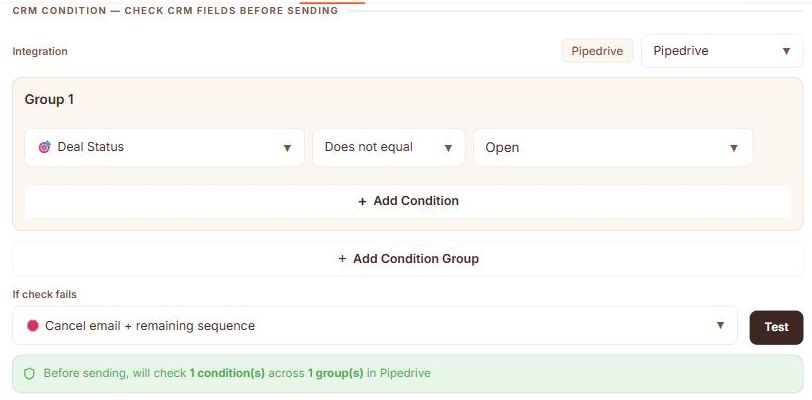
Read it as a sentence: before sending, check Pipedrive; if Deal Status does not equal Open, cancel this email and the rest of the sequence. The deal being won or lost is exactly the case where the remaining emails should never go out.
The confirmation line at the bottom is doing quiet but important work. It tells you the check happens before sending, which is what separates this from a filter that ran when the sequence was built.
Three places the CRM can stop a follow-up
The send-time check is the last line of defence, but it is not the only one. It helps to know all three, because they catch different problems:
- Before the workflow runs. A trigger can require a CRM condition, so a meeting only starts a sequence if a deal exists or sits in the right stage. Nothing is written at all if the condition fails.
- During the pipeline. A conditional step can halt the run before any email is generated, which saves the drafting work entirely.
- At send time. The check shown above, evaluated one moment before each email leaves.
The first two stop work from happening. The third stops a message that was already written and waiting, which is the one that actually saves you from the awkward email.
Choosing what happens when the check fails
"Stop" is not one behaviour, and the right choice depends on why the deal moved:
- Cancel the email and the remaining sequence. The deal is done, won or lost. Nothing further should go out.
- Cancel only this email. This specific message no longer fits, but the relationship continues.
- Skip this one and continue. The timing is briefly wrong. Let the cadence carry on.
Most teams want the first for closed deals and the third for temporary conditions. Being able to pick per email step is what keeps the sequence from being all-or-nothing.
Guard the later emails hardest
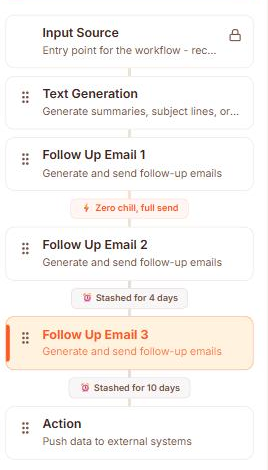
The risk is not evenly spread across a sequence. The first email goes out while the meeting is still fresh and the deal almost certainly has not moved. Email three, ten days later, is the one that arrives into a changed world.
Because the condition lives on the individual email step rather than the whole sequence, you can leave the first email ungated and put the deal-status check on emails two and three. Same cadence, and the only messages that get held back are the ones with a real chance of being wrong.
That also keeps the cost down: the check only runs where it earns its keep.
Conditions worth setting
- Deal status is not Open. The single highest-value rule. Covers won and lost in one condition.
- Deal stage is past the one this sequence is for. Stops a proposal chase reaching someone already in negotiation.
- Deal stage moved backwards. Rarer, but it stops a late-stage message landing on an early-stage deal.
- Deal owner changed. Prevents two reps appearing in the same thread.
Start with the first one. It prevents the most embarrassing category of send and takes about a minute to configure.
Where the content comes from still matters
CRM-aware follow-up controls whether an email sends. It does nothing about whether the email is worth reading. A generic template that correctly declines to send to a closed deal is still a generic template on every other send.
The two halves belong together: content built from what was actually said in the meeting, and a gate that checks the deal before it goes. That is why the same workflow that runs these conditions also writes each email from the transcript, the method described in turning meeting transcripts into follow-up emails.
How to set it up
Before any of this works the CRM has to be connected, which is a one-time step:
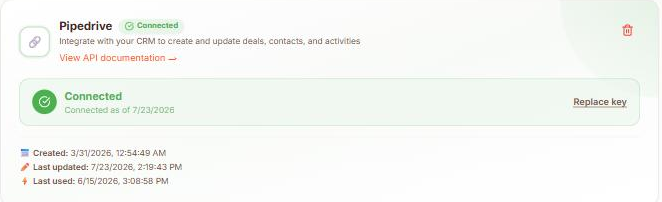
- Connect your CRM so the follow-up tool can read deals. In Scurry that is under Settings, then Integrations: connect Pipedrive directly, or paste an API key.
- Open the email step in your sequence and find its filters.
- Add the condition: Deal Status does not equal Open.
- Set the failure action. Cancel email plus remaining sequence is the sensible default.
- Repeat on the later emails in the sequence, which are the ones most likely to go stale.
The full setup lives under Pipedrive follow-up automation, and the wider approach under AI sales follow-up.
Frequently asked questions
What is CRM-aware follow-up?
Follow-up that reads your CRM immediately before each email sends and cancels or skips it when the deal no longer qualifies. It reacts to deal stage and status rather than running purely on a timer.
How is it different from a normal email sequence?
A normal sequence only knows about time. It sends on day one, day four, day ten regardless of what happened to the deal. CRM-aware follow-up re-checks the deal at send time and stops when the deal has moved or closed.
Why does the check need to happen at send time?
Because deals move after emails are queued. A check that ran when the sequence started only tells you the deal was fine then. Checking one moment before sending is what prevents an email going to a deal that closed yesterday.
Which CRMs does this work with?
Scurry supports Pipedrive today, using deal stage, status, owner, value and other deal fields as conditions.
Does it stop the whole sequence or just one email?
Your choice per email step: cancel the email and everything after it, cancel only that email, or skip it and let the sequence continue. Closed deals normally warrant cancelling the remainder.
Turn every sales meeting into a personalized follow-up sequence
Scurry reads your meeting transcripts and writes multi-touch follow-up emails from the actual conversation: pain points, budget, objections, and next steps included.
See how it works Start free with Scurry →
Founder of Scurry. Building AI that writes your sales follow-up sequences straight from your meeting transcripts, sent from your own inbox.