Everything Scurry does after your meeting ends.
The transcript arrives. From there it's all us, analyzing, writing, remembering, filtering, safety-checking, scheduling, until a real follow-up sequence lands in your inbox, ready for your green light.
 The pipeline
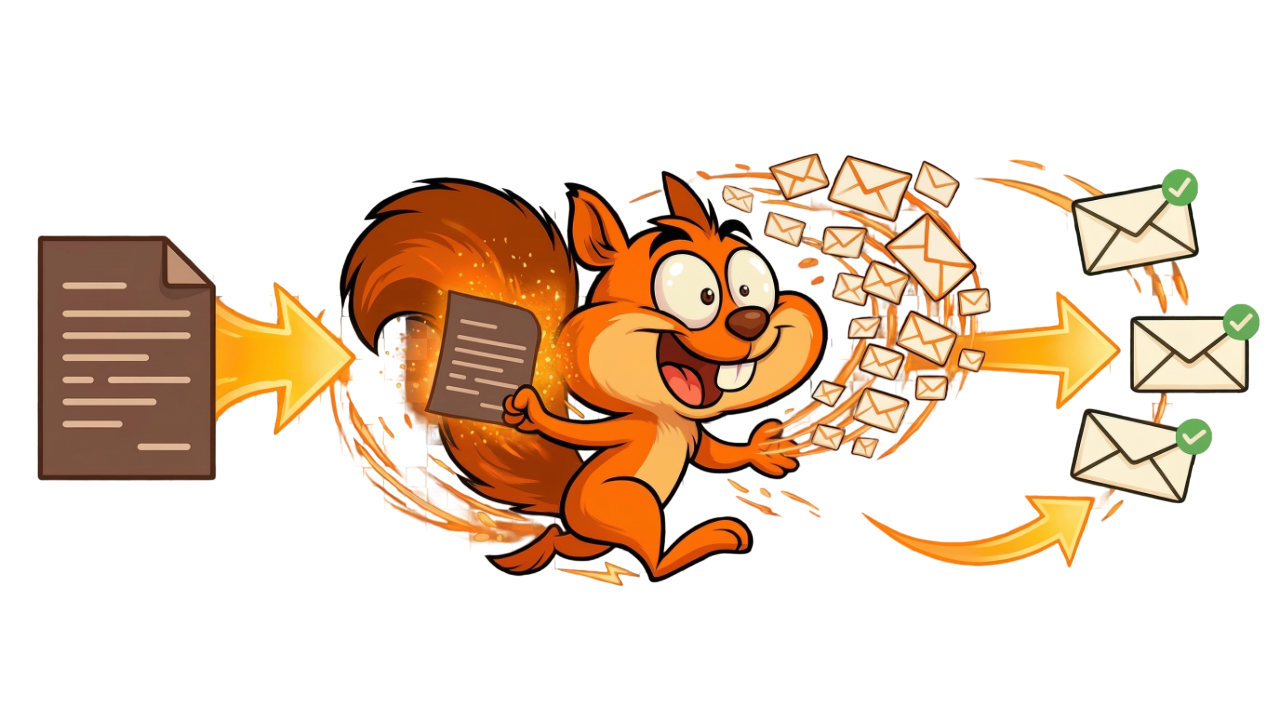
Transcript in. Full sequence out.
The conveyor belt from one meeting to a ready-to-send follow-up: no copy-paste, no re-prompting, no starting from a blank page.
Transcript Intelligence
Scurry reads the whole conversation the moment it lands: pain, objections, budget mentions, next steps, decision-maker names, buying signals. Extraction is tiered: essential fields first, bonus context second. Every email downstream is built from what was actually said.
Multi-touch email sequences
Not one email, a complete sequence. Unique subject lines and angles per touch, each referencing a specific meeting detail and what the previous emails already said. The multi-touch generator is our core trick. Single-email tools can't touch it.
Smart scheduling
Three timing modes per email: Immediate, Fixed delay (hours or days between touches), or AI decides, it picks the optimal send moment based on recipient timezone and engagement patterns. Business-hours-only toggle respects the recipient's local time, not yours.
AI-optimized timing · Redwood+
Action component
A visual workflow step any user can configure: push data to Pipedrive, fire a webhook, trigger SMS or WhatsApp, hit Zapier or Make. No code required.
Redwood+ only
Send from your inbox
Emails go out through your own Gmail or Outlook via OAuth. Prospects see your name, your address, your domain. Zero deliverability risk from our infrastructure.

Same-thread sending
Follow-up emails land in the same thread as your previous ones, not as separate new threads. Your prospect sees the conversation unfold the way a human would send it. Threading that actually looks human.
Oak+
Per-email analytics
Opens, clicks, replies, conversions tracked per email and per sequence. See which subject lines and angles land: per workflow, per industry.
 Relationship memory
Every email remembers everything.
Most tools send emails blind to the relationship. Scurry keeps a living memory of every contact, so every follow-up is informed by the whole history, not just the latest transcript.
Contact Pulse
A living AI summary of where each customer stands right now: sentiment, engagement, key topics, objections raised, last known intent. Regenerated automatically whenever something meaningful changes: a reply, a meeting, a deal-stage move. One glance and you know where the relationship is.
Timeline
Every email sent, every reply received, every meeting processed, every deal-stage change, logged chronologically per contact. Filter by deal, direction, or source. This is the source of truth. No more opening five tabs to piece a relationship together.
Thread digests
Scurry summarizes email threads as they happen: per-message summaries, overall sentiment, status (waiting on them, waiting on us, resolved). You never have to re-read a 40-message thread to figure out where things stand.
Relationship-aware writing (cross-workflow memory)
Scurry remembers every past touch across every workflow, not just the meeting you’re writing from. Every email, note, and signal about this contact and their org flows into the AI before it writes a word. No other tool does this.
Example: You meet Jamie at Acme today. Six months ago, a teammate emailed Chris (also at Acme) who said “we’re not buying this year.” Scurry reads that and adjusts the draft, softening the pitch or flagging the timing right in the writing.
Want it to auto-pause or cancel when context conflicts? That’s Fresh Check, Oak+.
Every plan

Contacts & organizations
Every person Scurry touches gets a full record: tracked by email, linked to their company. Contacts hydrate automatically on first interaction. 50-thread historical backfill so the AI never writes blind.

Meeting memory
Every meeting stored with its summary, key points, objections, and signals. Future sequences reference prior meetings automatically. Your fifth email knows what was said in your first call.
Your rulesAutomated, but you're always the boss.
Set your rules once, globally or per-email. Scurry generates inside the lines you draw. No drift, no surprises, no "did the AI just invent a fake statistic again."
Universal Prompts
Brand voice, required elements, formatting rules, banned phrases. Set once, applied to every sequence automatically. Your signature style, mandatory disclaimers, words the AI is never allowed to use, all locked in. No drift across reps, no drift across meetings.
circle back touch base synergyAI Filters
Plain-English conditions the AI evaluates before a sequence queues. "Only send if budget was discussed." "Skip if no next steps mentioned." "Proceed only if a decision-maker was on the call." Filters read the transcript content, not just metadata, they understand what was said, not what keyword was matched.
Oak and aboveCRM pre-send conditions
Build Pipedrive condition groups with AND/OR logic. Gate emails on deal stage, status, value, probability, owner, close date. Operators include equals, contains, greater-than, is-empty, and more. Conditions evaluate at send time, not queue time, so stale sequences never hit closed deals.
Requires Pipedrive
Resource Library
Upload PDFs, one-pagers, case studies, links. Scurry's AI picks which to attach to each email based on what the prospect needs. Four modes per resource: AI Decides, Always, Custom (conditional), or Off. Your sales collateral, contextually delivered.
Variables & email chaining
Drop variable tokens into any prompt: meeting summary, next steps, participant names, deal fields. Each email in a sequence automatically references what the previous emails already said, so email 2 never just rewrites email 1 in a different font.
Subject-line control
Written by Scurry by default, or write your own subject-line prompts per email. Supports variables so subjects reference specific meeting details, not just templated placeholders.
Oak+
Per-email prompts
Universal prompts cover the whole sequence. Per-email prompts control individual touches: what each one accomplishes, its word count, its angle. Both layer together.

Workflow inheritance
Create multiple workflows, discovery, demo, renewal, each with its own voice, filters, resources, and cadence. Meetings auto-route to the right workflow by type.
 Smart safety
Smart enough to not send.
Automation that knows when to stop. No more "just following up" after they already replied, moved deals, or went dark. The quiet layer that makes the whole thing trustworthy.
Reply + conflict detection
Real-time inbound detection via Gmail Pub/Sub and Outlook Graph: push, not polling. The moment your prospect replies, the sequence stops. Works whether they reply to the thread, a different email, or via a colleague at the same company. A 72-hour look-back catches context changes you forgot about.
Fresh Check (AI pre-send gate)
A colleague at the same company said no. Your prospect replied to a different sequence. Their deal just moved to Lost. The account went cold after weeks of silence. Fresh Check catches all of this, across workflows, across contacts at the same org, across your whole history with them, and picks the right action. Cancel the whole sequence. Skip this email. Reschedule for when they’re back from vacation. It’s the difference between automation that embarrasses you and automation you can trust.
Oak+DNC, bounces, and your domain
Mark any contact as Do-Not-Contact and Scurry cancels all queued emails instantly. Org-level DNC propagates to everyone at that company. Bounces are flagged, excluded from future sends, and pulled from active sequences automatically. All of this happens behind secure OAuth: emails send through your own Gmail or Outlook, your domain, your reputation.
Setup, review & shipNever stare at a blank prompt again.
Setup is a conversation, not a form. And nothing sends without your green light.
Setup Squirrel
An in-app conversational assistant that walks you from zero to a fully-configured workflow in about seven minutes. Asks your industry, style, goals, and timing: then writes your Universal Prompt, email prompts, and filters for you. Show a new teammate their first workflow? It builds itself.
Review & approve queue
Every generated email sits in a queue before sending. See the subject, body, scheduled time, and any conflict warnings. Approve, edit, reschedule, or cancel. Flag any email as Requires Review and it won't send without explicit approval, perfect for high-value deals.
Quick AI Edit
Click the sparkle on any pending email and type an instruction: "make it more casual," "add urgency about the Q2 deadline," "shorten to three sentences." The AI regenerates in place. One click to Revert if you don't like it. It's the remote control for the writer.

Workflow chat builder
Create and modify workflows in plain English. "Add a fourth email, 5 days later, asking for a demo." See the diff before it applies. No more clicking through component forms.
Team & admin controls
Multi-seat support with per-user Acorn allocation (pooled or locked), role-based permissions, audit log, and a usage + cost dashboard. Solo or team, it scales with you.
Connects toWorks with your existing stack.
Plug Scurry in where your data already lives. No new habits to learn.
Your transcript source
Any tool that generates meeting transcripts works with Scurry. Native webhooks for the top six; open endpoint for everything else. OAuth once, transcripts flow forever.

Your inbox & CRM
Gmail and Outlook via secure OAuth. Pipedrive for deal-stage awareness and pre-send CRM checks (optional, the core product works without it). HubSpot native support is in development.




Fueled by acorns.
Acorns fuel the AI: sequence generation, summaries, Quick AI Edits, Fresh Check. Both plans include them. Unused Acorns roll over while you are subscribed. Stock up anytime.
The stuff people actually ask.
Every feature above.
Free to try.